
Free Bar Inventory Template (Count Sheet + Usage Tracker)
A free bar inventory template with no email required: a printable count sheet plus a spreadsheet for Google Sheets or Excel, built so your count lines up with what you sold.
What should a bar inventory sheet include? A bar inventory sheet needs one row per item, per size and format, per section of the bar. Include the vendor item number, pack size, the count unit you actually count in, the count itself with open bottles in tenths, a par level, and who counted and when. Add received items and units sold to see usage.
How do you tie a bar inventory count back to sales? Work out what you used: opening count plus deliveries received, minus closing count. Pull units sold for the same dates from your POS item sales report and convert them to the same count unit. The difference between used and sold is your gap. Check receiving, transfers, comps and counting before assuming loss.
How do you do inventory with more than one bar? Give each bar, cooler and storeroom its own count sheet, ordered the way you walk it, and log every transfer between them with a date and quantity. Roll the sections up into one venue total for usage. Counting one product as a single line across bars hides which bar is running short or over-ordering.
What is in the template
One spreadsheet with ten tabs, plus a printable count sheet for the clipboard. Cream cells are for typing; grey cells are formulas you do not need to touch.
| Tab | What it does |
|---|---|
| Read Me / Count Method | Write down your sections, count day and time, row order and open-bottle method once, so the next manager inherits the method along with the file. |
| Items | Your master list, built once. One row per item, format and size, with vendor item number, purchase unit, pack size, count unit, cost and the POS item name. |
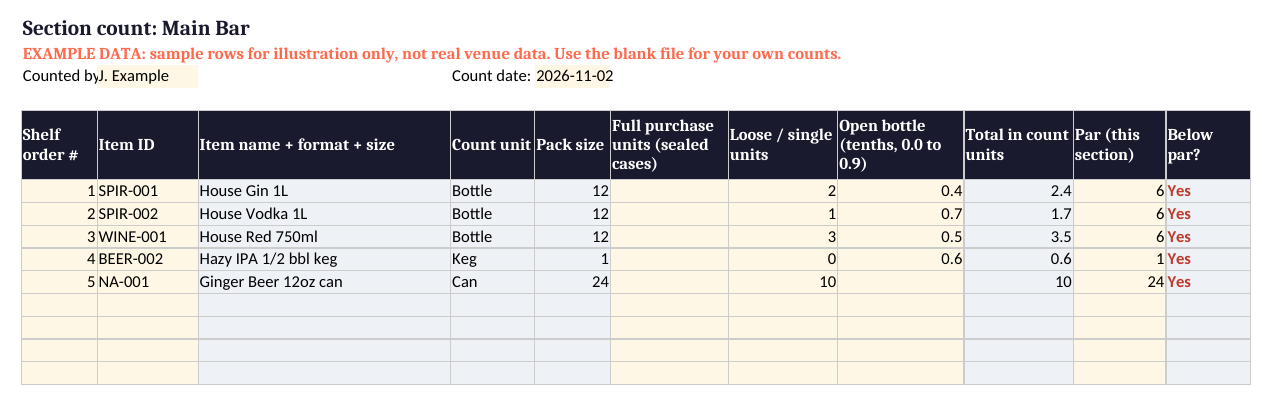
| Section sheets (Main Bar, Patio Bar, Walk-in, Storeroom) | One tab per area you count. Pick an Item ID, enter full cases, loose units and open bottles in tenths, and the total and below-par flag fill in. |
| Received | Log each delivery from the invoice. Purchase units convert to count units automatically. |
| Transfers | Log every move between sections: date, item, from, to, quantity and who moved it. |
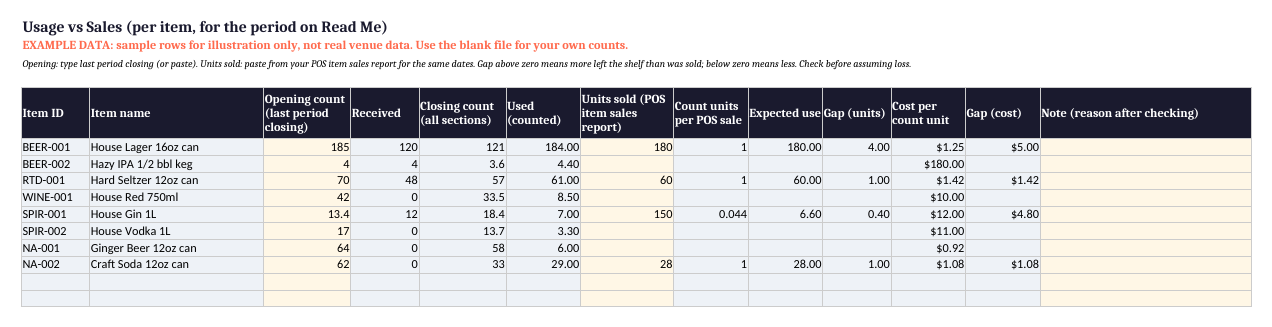
| Usage vs Sales | Lines up opening count, received and closing count with units sold from your POS item sales report, and shows the gap in units and in cost. |
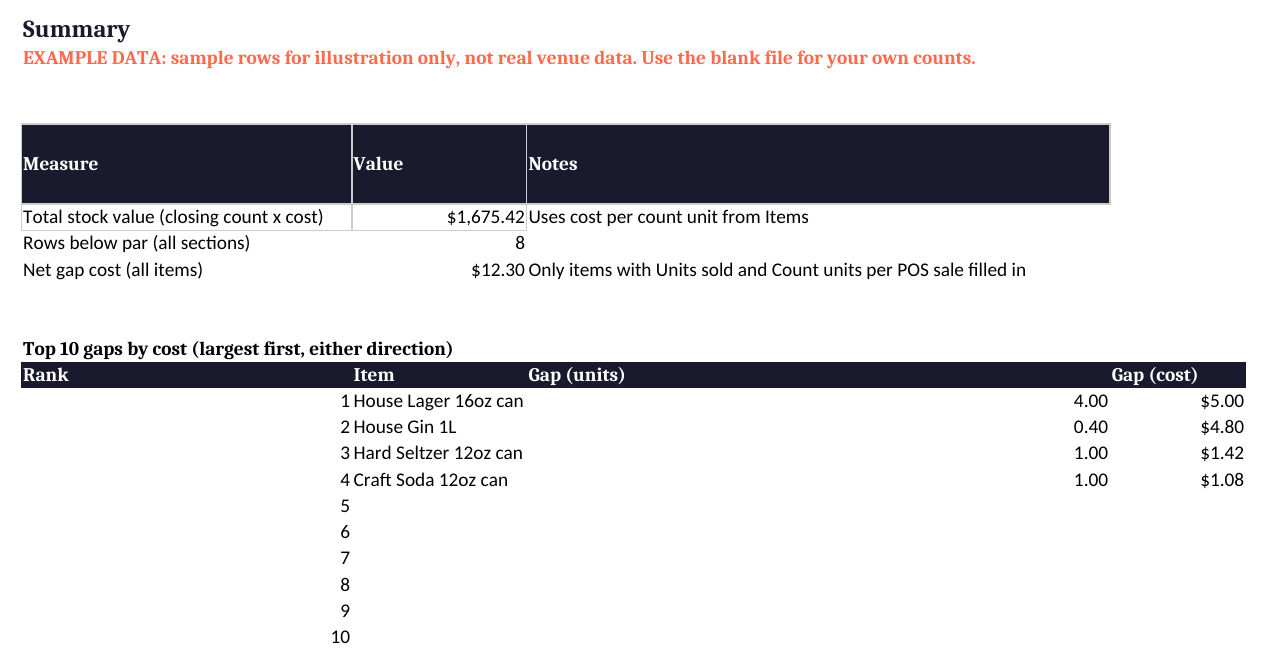
| Summary | Total stock value, rows below par, and the ten biggest gaps by cost. |
How to use this template
Add one row per item, format and size on the Items tab. A 16oz can and a keg of the same beer are two items.
Use what staff can see and say out loud: can, bottle or keg. Pack size converts sealed cases for you.
Walk each bar, cooler and storeroom the same way every time and fill its own tab, or use the printable sheet and type it in after.
Paste units sold from your POS item sales report for the same dates, then read the gap and note what you find.
What a bar inventory sheet needs
Every column in the template answers a question you will ask later. The vendor item number lets you match a row to an invoice line. Purchase unit and pack size describe how the item arrives, while the count unit is what you hold in your hand during the count. Cost per count unit turns a count into dollars. The POS item name, written exactly as it appears on your item sales report, is what lets the sheet line up with sales.
Keep one row per item, per format, per section. If the House Lager lives on the patio and in the walk-in, it appears on both section tabs. That is what lets you see which area is running short, and it keeps the count honest when product moves between bars.
How to count a bar, step by step
Same day, same time, before deliveries
Pick one count time and keep it, ideally after close or before open and before any delivery is put away. Consistent timing keeps every period comparable.
Walk in shelf order, one sheet per section
Order each section tab the way you physically walk it, left to right, top to bottom. You will count faster and skip fewer items. Give every bar, cooler and storeroom its own sheet.
Sealed units whole, open bottles in tenths
Sealed bottles count as 1. Open bottles get a tenth from 0.0 to 0.9 based on the fill line, and two open bottles of the same item add together. A scale is optional for your highest volume bottles if you want a tighter number.
Cans, cases and kegs: count what is in front of you
Enter sealed cases in the full purchase units column and loose cans in the loose column, and the pack size does the math. Example: 4 sealed cases plus 7 loose cans of a 24 pack is 103 cans. Kegs work the same way, with a partial keg estimated in tenths.
Write down who counted and how
Each section tab has a Counted by and Count date header, and the Read Me tab records the method. When a manager changes, the method stays with the file.
How to tie your count back to sales
This is the step most sheets leave out, and it answers the question owners actually ask: did what left the shelf match what we sold?
- Work out what you used. Used = opening count + received minus closing count. The Usage vs Sales tab does this for every item, pulling received from the Received tab and closing from every section tab.
- Pull units sold. Run your POS item sales report for the same dates as your two counts and paste units sold next to each item.
- Convert to count units. Set how many count units one POS sale uses. A can sold as a can is 1. For pours from a bottle or keg, set the value yourself from your pour size, or leave it blank until you are ready.
- Read the gap. Gap = used minus expected use. Above zero means more left the shelf than was sold; below zero means less. The cost column shows which gaps matter most.
Example (illustrative numbers, not customer data): House Lager 16oz cans opened the week at 185. Five cases arrived, adding 120. The closing count across the patio and walk-in was 121, so 184 cans were used. The item sales report showed 180 sold, so the gap is 4 cans, or $5.00 at $1.25 a can.
What a gap usually means
A gap is a prompt to check, not a verdict. Common causes include a delivery that was not logged, a transfer between bars that was not written down, comps or spills that were not rung in, pour sizes drifting, or a simple counting slip. Write what you find in the Note column so the next period starts clean.
Running more than one bar
Taprooms with a patio, dog park bars with a yard bar, and food halls with a shared bar all move product between areas during the week. Give each area its own section tab, log every move on the Transfers tab, and let the Usage vs Sales tab roll every section into one venue total. Transfers net to zero for the venue as a whole, so they never distort venue usage, and the log lets you check any single section: opening + received + transfers in minus transfers out minus closing.
How often to count, and setting par
Weekly is a practical rhythm for most bars, with the same day and time each week. Once you have a few weeks of the Used column, set par per section: enough to reach the next delivery plus a small buffer. The section tabs flag anything below par, and the Summary tab totals them.
Planning the rest of your venue? Browse more free dog park bar templates. Related: Tabski retail inventory.
Questions operators ask
What should a bar inventory sheet include?
A bar inventory sheet needs one row per item, per size and format, per section of the bar. Include the vendor item number, pack size, the count unit you actually count in, the count itself with open bottles in tenths, a par level, and who counted and when. Add received items and units sold to see usage.
How do you tie a bar inventory count back to sales?
Work out what you used: opening count plus deliveries received, minus closing count. Pull units sold for the same dates from your POS item sales report and convert them to the same count unit. The difference between used and sold is your gap. Check receiving, transfers, comps and counting before assuming loss.
How do you do inventory with more than one bar?
Give each bar, cooler and storeroom its own count sheet, ordered the way you walk it, and log every transfer between them with a date and quantity. Roll the sections up into one venue total for usage. Counting one product as a single line across bars hides which bar is running short or over-ordering.
How do you count partial liquor bottles?
Count sealed bottles as whole units and estimate open bottles in tenths, from 0.0 to 0.9, by looking at the fill line. If a section has two open bottles of the same item, add the tenths together. For your highest volume bottles, weighing them on a scale gives a tighter number if you want it.
How often should a bar take inventory?
Most bars count weekly, at the same day and time, before deliveries arrive. Keeping the timing consistent matters more than the exact day, because it keeps each period comparable. Some venues count high value spirits more often and the full bar weekly or monthly.
Should you count bottles, cases or kegs?
Count in the unit you can see and hold: cans, bottles, or kegs. Record sealed cases as full purchase units and let the pack size convert them, so 2 cases and 7 loose cans of a 24 pack become 55 cans. Then match that count unit to how the item is sold on your POS.
How do you set par levels for a bar?
Start from your usage. Par is the amount a section should hold to get through to the next delivery, plus a small buffer. Use a few weeks of the Used column from the template, then adjust for busy weekends and events. Set par per section, since a patio bar and a storeroom need different amounts.
Related resources
Running a bar, taproom or food hall on Tabski?
See how Tabski handles tabs, payments and ordering for your kind of venue.
Restaurant and bar POS Brewery and taproom POS Dog park bar POS Book a Demo