
Tabski vs SpotOn for Food Halls
Tabski vs SpotOn for Food Halls
SpotOn is built to serve restaurants and hospitality groups with traditional single-merchant operations. Food halls are different: multi-vendor ordering, tenant isolation, operator-level reporting, and automated rent collection require a multi-tenant platform — not stitched workflows.
Automated Rent Collection Built Into the Food Hall POS
Stop living in spreadsheets. Tabski automates percentage rent using real-time tenant sales data.

Tabski
Tabski turns rent into a system workflow: track vendor sales automatically, apply rent rules, and generate rent statements without manual math — even with high mobile ordering volume.
- Percentage rent + thresholds (base + overage)
- Vendor rent statements + operator rollups
- Designed for tenant turnover and clean month-end close
Tenant Isolation for Menus, Employees, and Sales (With Operator Oversight)
Vendors need independence. Operators need a birds-eye view — without shared-account chaos.
Tabski
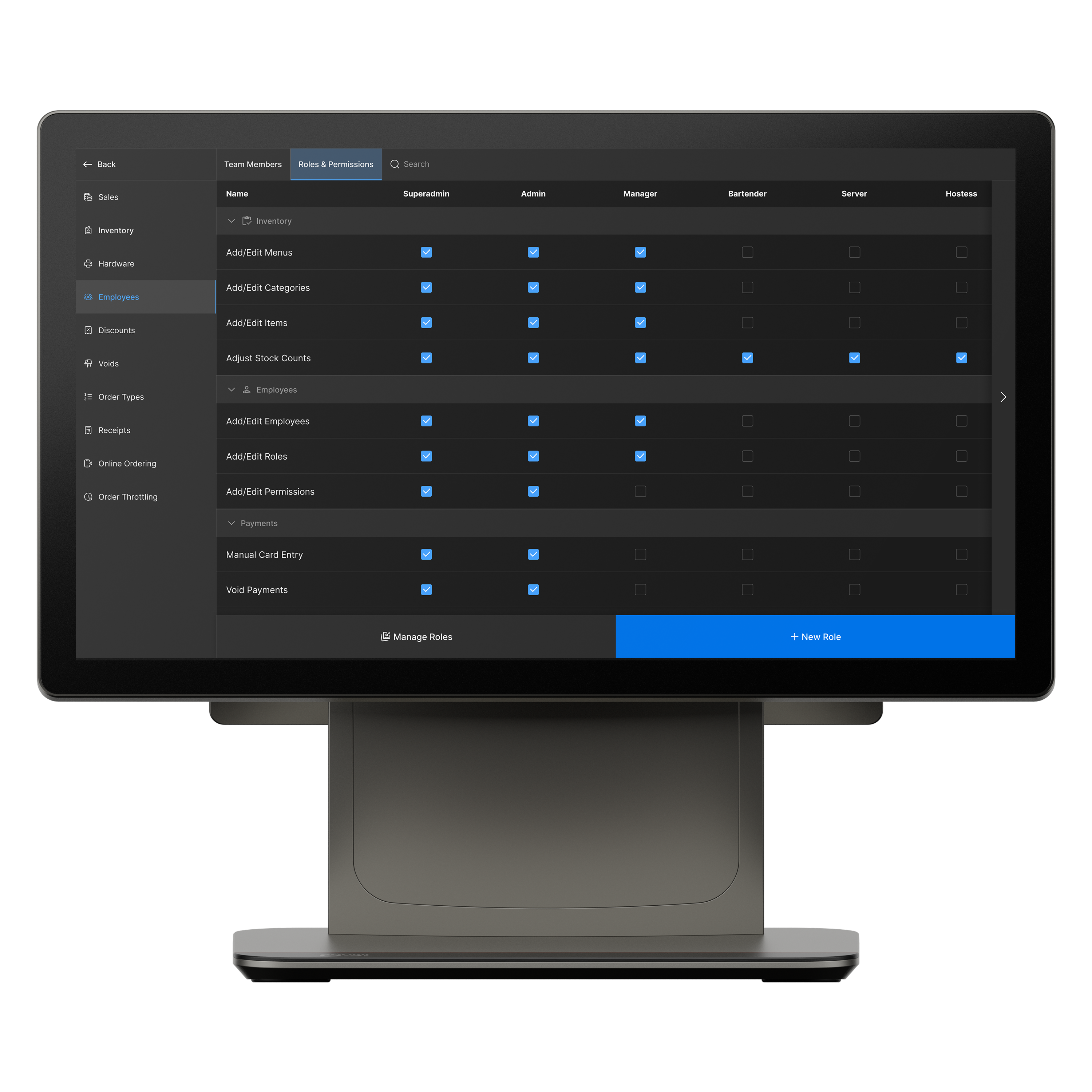
Tabski is built for multi-tenant venues. Each vendor has its own menus, staff permissions, and reporting — while the operator has rollups across the entire hall.
- Separate vendor menus, employees, and permissions
- Vendor reporting stays clean even as tenants rotate
- Operator dashboards: rollups, comparisons, dayparts, mobile share
Multi-Vendor Ordering: One Cart, One Checkout
Guests don’t want to place separate orders. Food halls win when ordering is unified.

Tabski multi-vendor flow
Guests browse multiple vendors, add items from different kitchens, and complete a single checkout — while Tabski routes items to the correct vendor and keeps accounting clean.
- Cross-vendor cart + vendor routing
- Unified checkout increases conversion
- Clean vendor-level reporting and operational separation
Aggregated Online Ordering Journeys Drive More Covers
One website journey increases vendor discovery and boosts multi-vendor orders for pickup and delivery.

What “aggregated” actually means
Tabski keeps the whole hall inside one online ordering flow — instead of sending guests into separate vendor sites and separate checkouts. That means fewer drop-offs and more vendors per visit.
- One discovery experience across all vendor menus
- One checkout for pickup and delivery
- Better merchandising across the entire hall (featured vendors, popular items)
Food Hall KDS With Real-Time Payment Logic (Refunds + SMS)
When kitchens run out of items, the system should handle it — not your staff.

Built for public-space operations
In food halls, the guest may be seated or in another line. Tabski links KDS actions to payments: out-of-stock workflows can trigger refunds and notify the guest via SMS.
- Out-of-stock actions can initiate refund logic
- Automated SMS updates reduce confusion
- Cleaner audit trails for operator and vendor accountability
Open Tabs Synced With Mobile Orders for Busy Bars
Let guests start a tab on mobile and let staff add to it from the POS — one unified check.

Unified tab workflows
High-volume food hall bars need flexibility. Tabski supports open tab workflows that stay unified across POS and mobile ordering so the guest and bartender always see the same check.
- Mobile tab open + POS add-ons
- Consistent running balance and close-out flow
- Cleaner reconciliation for bar revenue
Tabski vs SpotOn: Food Hall Feature Comparison
Quick view of the features that matter most in multi-tenant food hall operations.
| Feature | Tabski | SpotOn |
|---|---|---|
| Automated rent collection | Yes (native) | Typically manual workflows |
| Tenant isolation + operator dashboards | Full | Not food-hall-native |
| True multi-vendor ordering | Native | Often requires custom flows |
| Aggregated online ordering (one journey) | Yes | Often fragmented by vendor |
| KDS tied to payment logic | Yes | More staff intervention |
| Refund workflows + automated SMS | Yes | Typically manual steps |
| Open tabs synced across POS + mobile | Yes | Depends on setup |
See Tabski in Action
Book a demo to see multi-vendor ordering, automated rent, and operator dashboards live.