
Getting started with Tabski HR
Getting started with Tabski HR
Tabski HR runs scheduling, timesheets, tips and payroll for your team from one place, connected to your Tabski restaurant and food hall POS. Everything lives in the left navigation. The top bar has Help and the business and user menu, where you switch between locations.
Steps
- Open Setup to see which setup steps remain, such as jurisdiction and overtime, hourly wages and break types.
- Set up Employees → Roles & permissions.
- Check your team. Employee records sync automatically from Tabski POS into Tabski HR. Add anyone new with + New Employee.
- Configure Tips → Settings: the optional card fee, payout method and tip pools.
- Review Timesheets → Clock rules and Schedules → Settings.
- Connect payroll under Payroll → Gusto, or use Exports for another provider.
- Use Dashboard, Approvals and Log Book day to day.
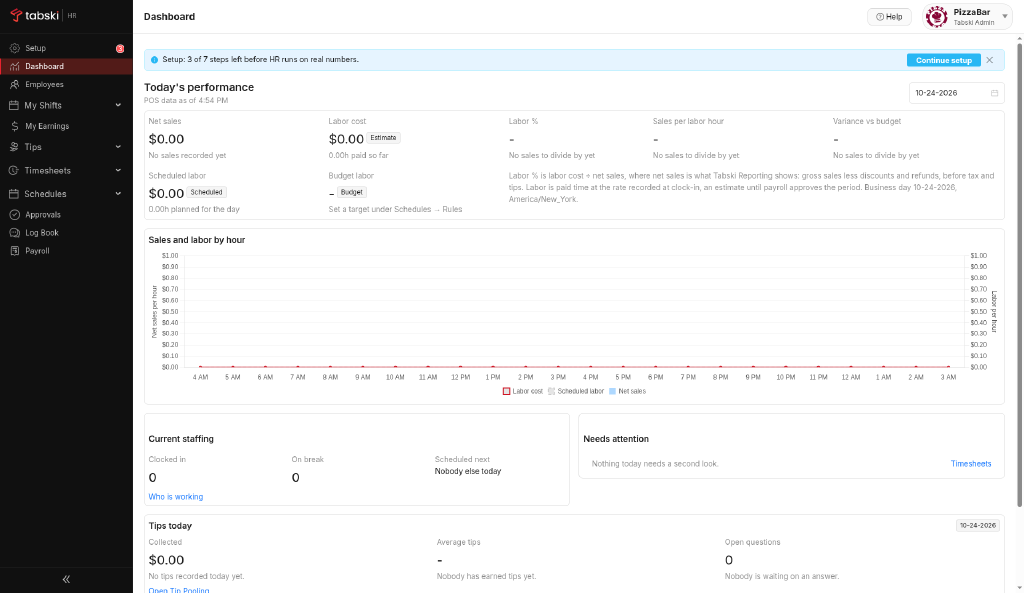
Where things are
| Menu | What you’ll find |
|---|---|
| Setup | Setup checklist |
| Dashboard | Real-time labor vs sales |
| Employees | Team members, Roles & permissions, + New Employee |
| My Shifts / My Earnings | Employee self-service views |
| Tips | Tip Pooling, Dayparts, Settings |
| Timesheets | Time clock, Clock rules |
| Schedules | Shift Builder, Recurring Shifts, Open shifts, Availability, Settings |
| Approvals | Schedule, Timesheet and Tip questions queues |
| Log Book | Manager shift notes |
| Payroll | Summary, Exports, Gusto, Compliance |
New to Tabski HR? See how it works with your restaurant and food hall POS on the Tabski HR page.