
Tabski HR
Tabski HR: restaurant scheduling, timesheets, tip pooling and payroll inside your POS
Your labor cost, live against your sales.
Employee scheduling, time and attendance, tip distribution and payroll built on the same ledger that already runs your orders and payments. Labor percentage stops being a report you pull on Monday and becomes a number on the wall at 6:40 PM.
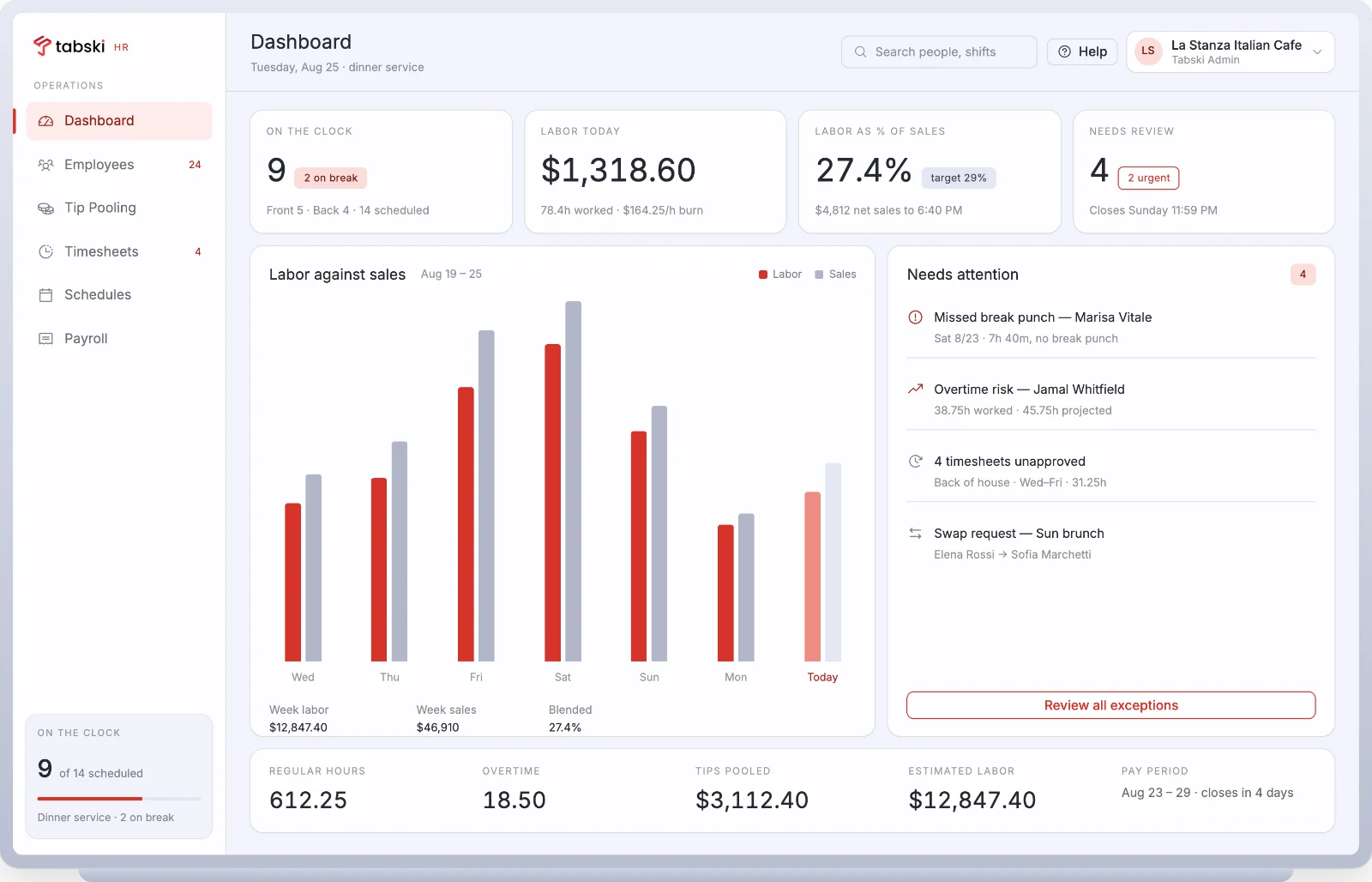
Labor is your second largest line. Stop running it in a second system.
Standalone scheduling tools import your sales overnight and guess at your tips. Tabski HR reads the same ledger the terminal writes to, so hours, tips, sales and labor percentage all reconcile to one number, and nobody exports a spreadsheet to find out.
Six things you currently do in six places
Scheduling, time and attendance, tip distribution, payroll, team messaging and a staff app. One product, one login, one bill.
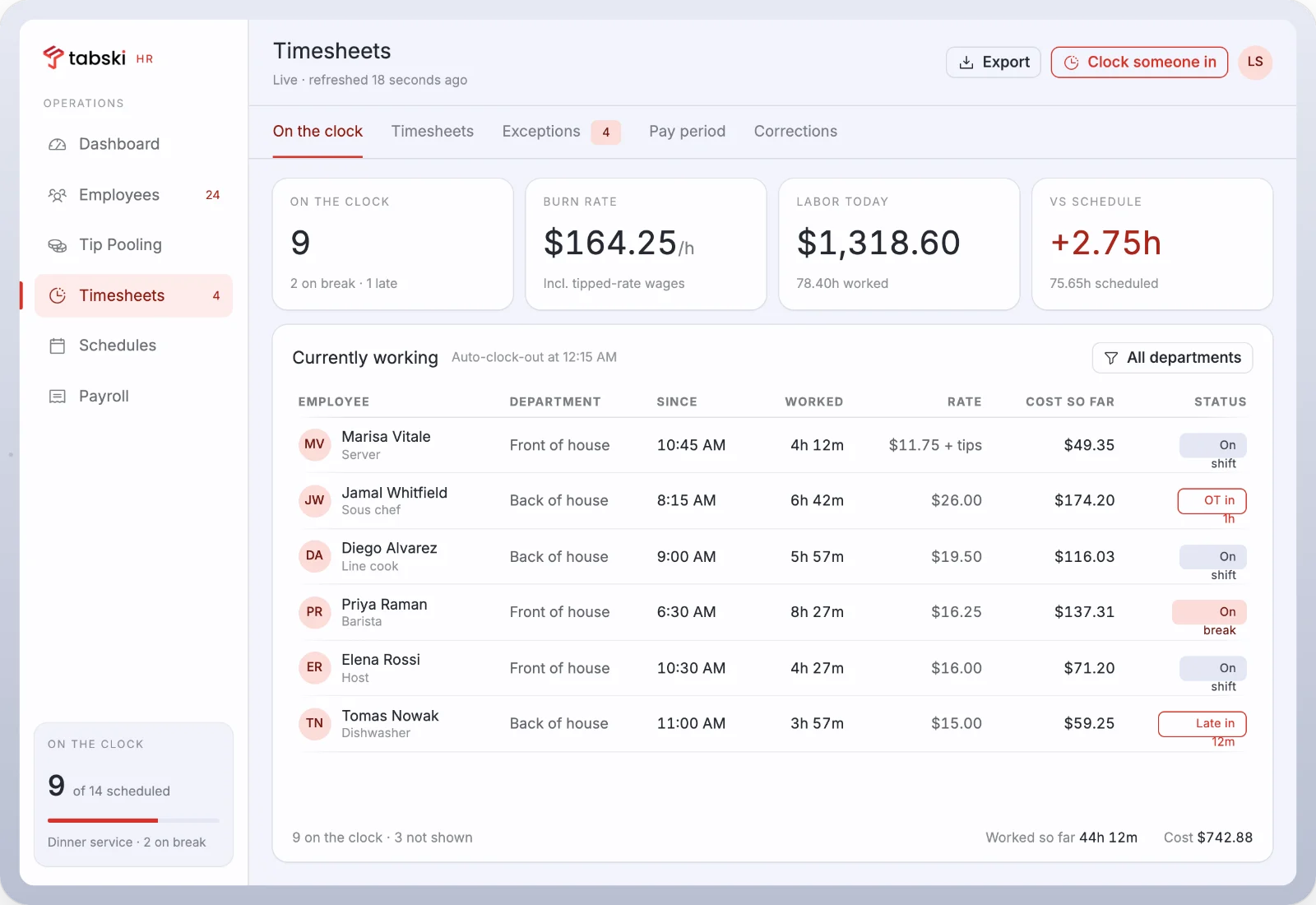
Know what the floor costs while the floor is still working
Every punch lands with a department, a rate and a running cost. Burn rate, hours against schedule, and who is drifting into overtime, all before you approve anything.
- Clock in from the POS terminal, a shared tablet, or the staff app with a PIN
- Missed breaks, late punches and overtime risk surface as exceptions, not surprises
- Tipped rates, blended overtime and automatic clock out handled in the record
- Corrections keep an audit trail through to the approved pay period
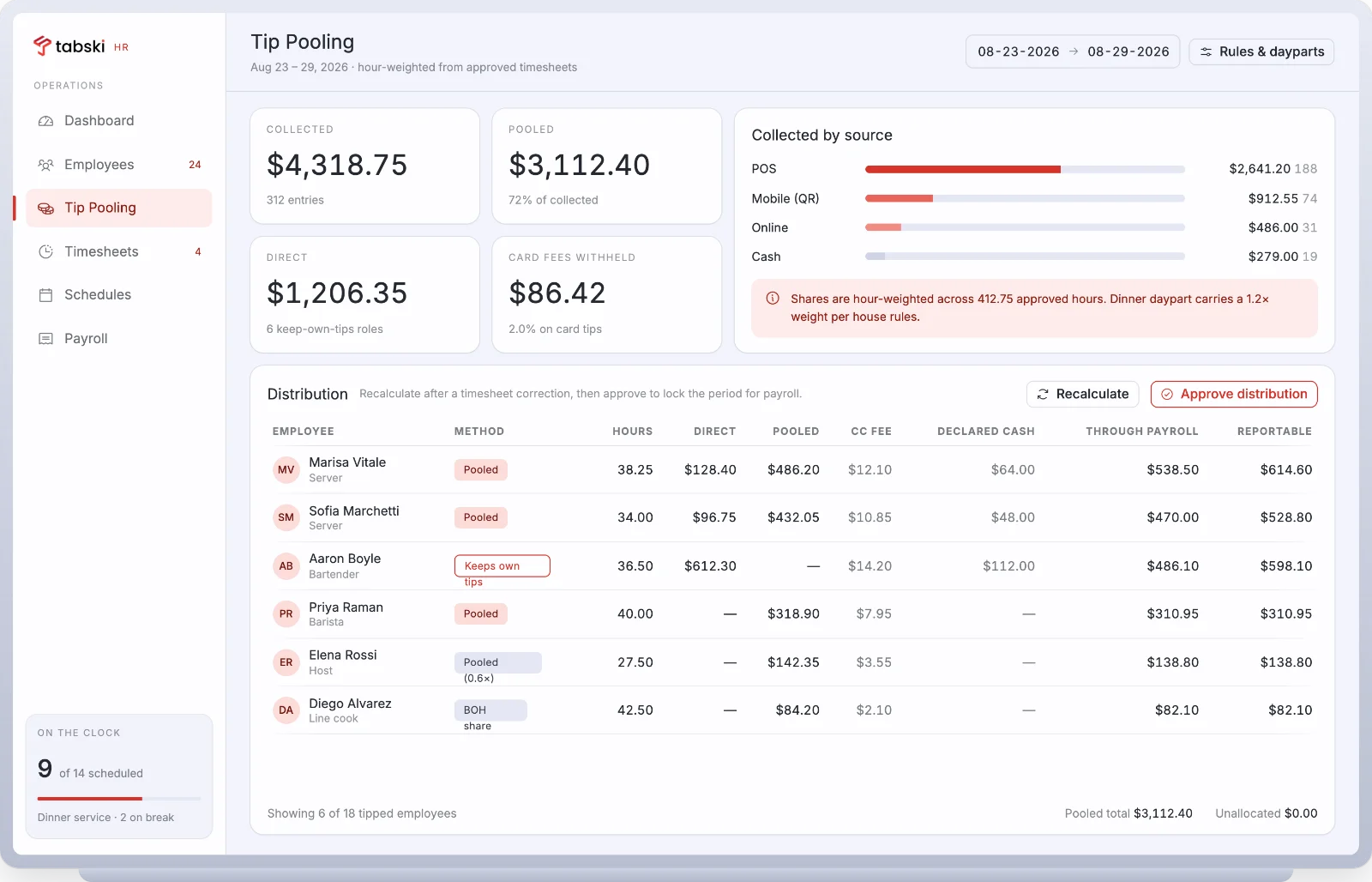
The tip pool calculates itself, because the tips never left
POS, QR, online and cash tips are already in the ledger. Set the house rules once and the distribution is hour weighted off approved timesheets, every period, with nothing left unallocated.
- Pooled, keep own tips, weighted share and back of house share, side by side
- Daypart multipliers and role weights, so dinner can carry 1.2× and host 0.6×
- Card fee withholding and declared cash tracked separately from reportable tips
- Approve once to lock the period, then the payroll run reads the same figures
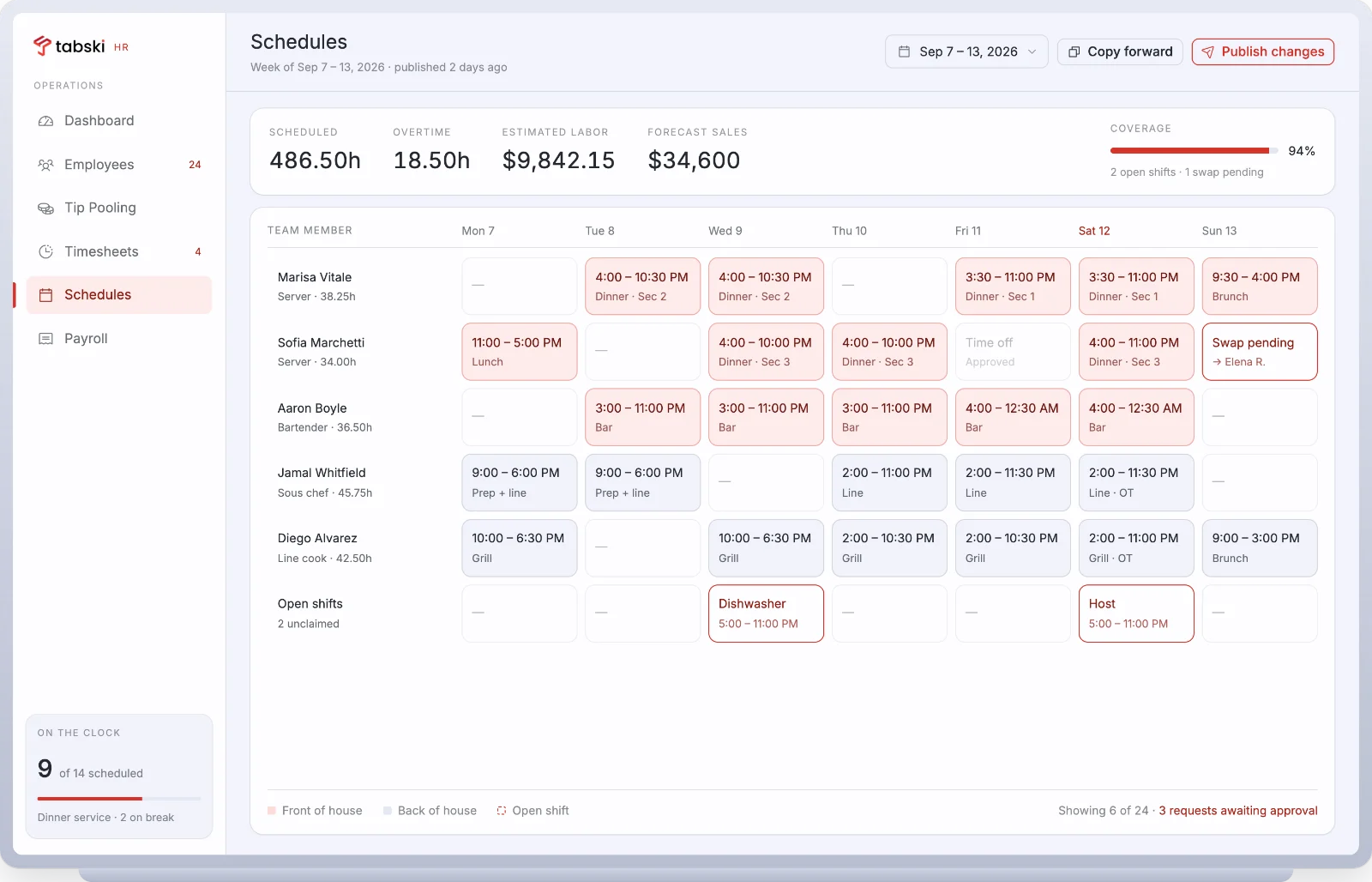
Build the week against the forecast, not against last week
Estimated labor and forecast sales sit at the top of the grid while you drag shifts. Coverage, open shifts and pending swaps are visible before you publish, and publishing notifies everyone at once.
- Overtime flagged as you build it, per person and per department
- Open shifts staff can claim, with manager approval on the way through
- Copy a week forward, then adjust, with sections, stations and dayparts intact
- Approved time off blocks the slot instead of living in someone’s texts
Shift swaps stop happening in the group chat
Staff request the swap in the app, the system checks the rules, and a manager taps once. The schedule updates, the labor forecast updates, and there is a record of who agreed to what.
- Swaps and pickups checked against role, certification and overtime before they reach you
- Time off requests land next to the coverage they would affect
- Shift notes and announcements, read receipts included
The pay period closes with the tip math already done
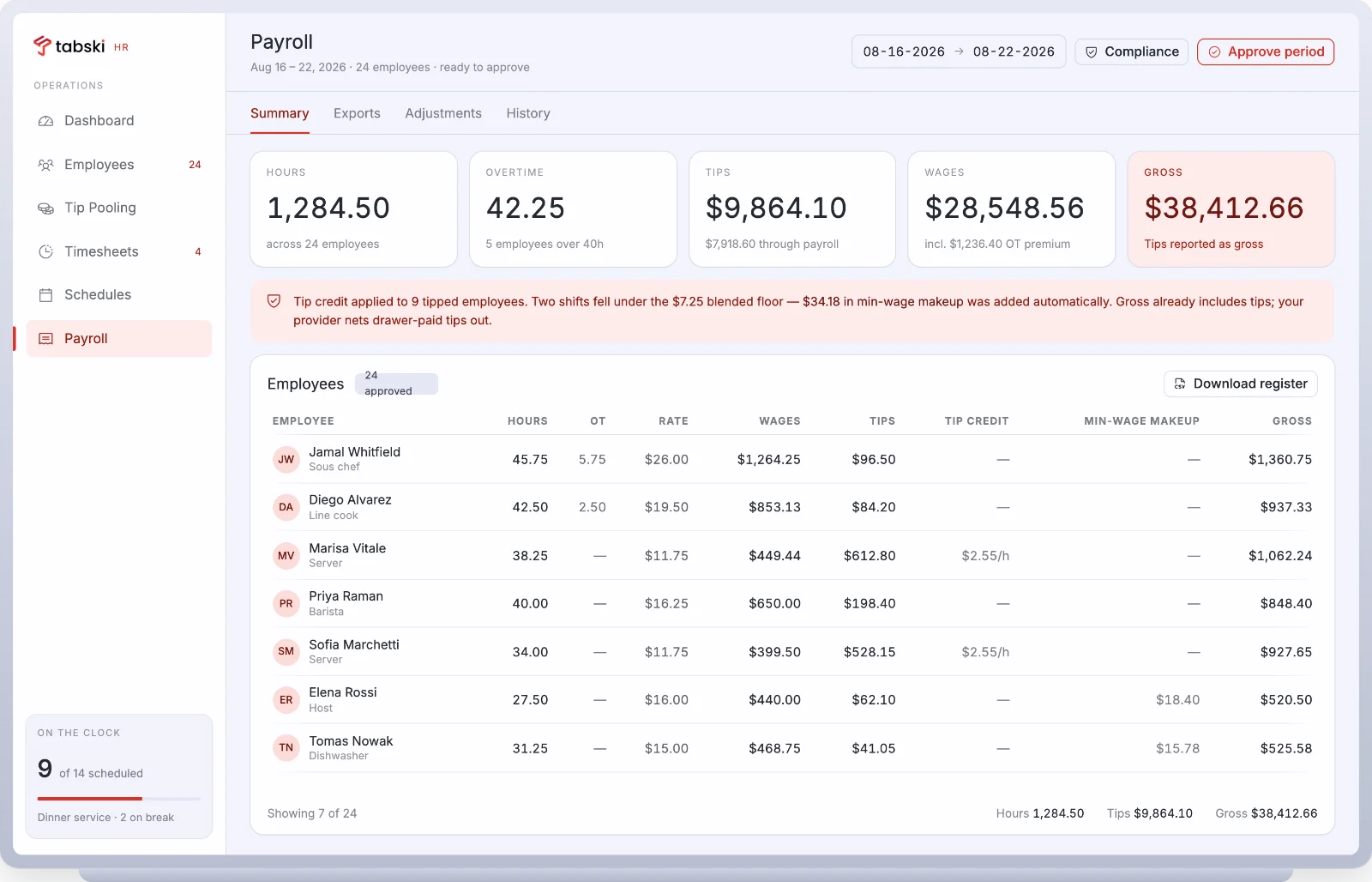
Payroll runs inside Tabski, filed and funded by our payroll partner. Hours, overtime premium, tip credit and minimum wage makeup carry straight from approved timesheets and the locked tip period. One register, one approval.
- Tip credit applied per employee, with makeup added where a shift falls under the blended floor
- Tips reported as gross, with drawer paid tips netted out by the provider
- Register, adjustments and history downloadable for your accountant
- Tax filing, direct deposit and year end forms handled by the embedded provider
Payroll is delivered through a licensed payroll partner embedded in Tabski. Availability varies by state, and your implementation team confirms coverage during onboarding.
Installs from a text message. No app store, no rollout.
Staff and managers get progressive web apps that add to the home screen from a link, which is the practical answer for a team that turns over. Push alerts arrive on the phone in seconds, not at the end of the shift.
- Staff app: schedule, punches, swaps, tip share, pay stubs
- Manager app: approvals, exceptions and live labor from anywhere in the building
- Works on any phone the team already owns, iOS or Android
One roster the terminal, the schedule and the pay run all read
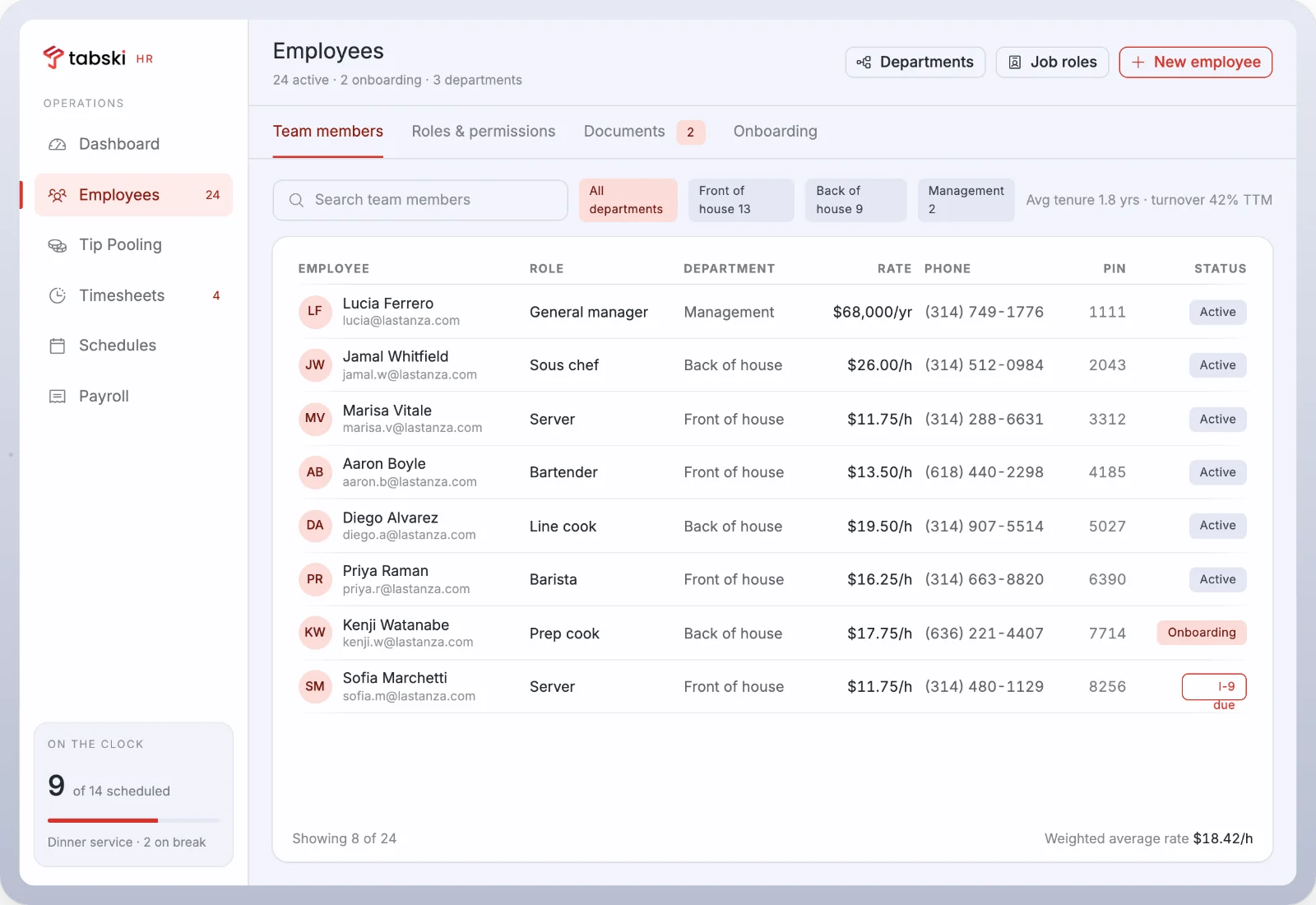
Add a hire once and they exist everywhere: a POS login, a clock in PIN, a role with permissions, a rate, and a document checklist that flags an I-9 before it becomes a problem.
- Roles and permissions per department, venue or tenant
- Onboarding, document expiry and certification tracking
- Tenure and turnover visible without a separate report
Tabski HR against the standalone scheduling tools
7shifts and Homebase are good scheduling products. They sit beside your POS. Tabski HR is inside it, which changes what the numbers can do.
| Capability | Tabski HR | 7shifts | Homebase |
|---|---|---|---|
| Sales data behind labor percentage | Same ledger, live | POS integration, synced | POS integration, synced |
| Tip pooling source data | Native, tips already in the ledger | Imported from POS | Imported from POS |
| Multi-vendor and per tenant teams | Built in, venue rollup | Per location | Per location |
| Payroll | Embedded, tip credit aware | Add on or partner | Add on |
| Staff app distribution | Web app from a link | App stores | App stores |
| Systems to reconcile at close | One | Two | Two |
| Vendors, logins and bills | One | Separate | Separate |
Comparison reflects publicly documented capabilities at time of writing. Verify current details with each vendor.
Two operations, one architecture
Food halls and ownership groups
Each tenant runs its own roster, schedule, tip rules and pay run. The venue sees consolidated labor against consolidated sales, on the same tenant level architecture that already handles ordering, settlement and automated rent.
Restaurants, bars and breweries
One site or a small group. Front of house on tipped rates, back of house on hourly, bartenders keeping their own, all in one pay period, without a spreadsheet arbitrating between them.
Tabski HR, answered
What operators ask before they put scheduling, tips and payroll on the same system as their POS.
Does Tabski HR replace my scheduling app?
Yes. Tabski HR covers scheduling, time and attendance, tip pooling, payroll, team messaging and the staff app, so a separate scheduling subscription is no longer needed once you are live.
Do I have to switch my POS to use Tabski HR?
No POS migration is required to start the conversation. Your implementation team maps what stays on your current system and what moves, and the rollout is scoped venue by venue.
How does tip pooling work?
Card, QR, online and cash tips are already recorded against the check, so the pool is built from your own ledger. You set house rules once, including daypart multipliers and role weights, and shares are hour weighted off approved timesheets with nothing left unallocated.
Is payroll included?
Payroll runs inside Tabski through a licensed payroll partner that handles tax filing, direct deposit and year end forms. Hours, overtime premium, tip credit and minimum wage makeup carry over from approved timesheets. State availability is confirmed during onboarding.
Does it work for a food hall with multiple vendors?
Yes. Every tenant gets its own roster, schedule, tip rules and pay run, and the venue sees a consolidated view of labor against sales. It uses the same tenant level architecture as Tabski multi-vendor ordering and settlement.
What do staff have to install?
Nothing from an app store. Staff and managers get progressive web apps that install from a link and add to the home screen on any iOS or Android phone, which keeps rollout practical for a team that turns over.
How is Tabski HR different from 7shifts or Homebase?
Those tools integrate with a POS and sync data across. Tabski HR reads the same ledger the terminal writes to, so labor percentage is accurate mid shift and tip pools are calculated from source rather than imported.
When can I get it?
Tabski HR is in early access and onboarding a limited number of venues per cohort so implementation stays hands on. Join the waitlist and we will scope the rollout with you.
Get Tabski HR in your venue before everyone else does
We are onboarding a limited number of venues per cohort so implementation stays hands on. Tell us about the operation and we will map the rollout, including what stays on your current POS.
Prefer to talk it through first? Book a walkthrough and we will scope it with you.