
Food Court POS
The POS Built for Food Courts & Multi-Stall Markets
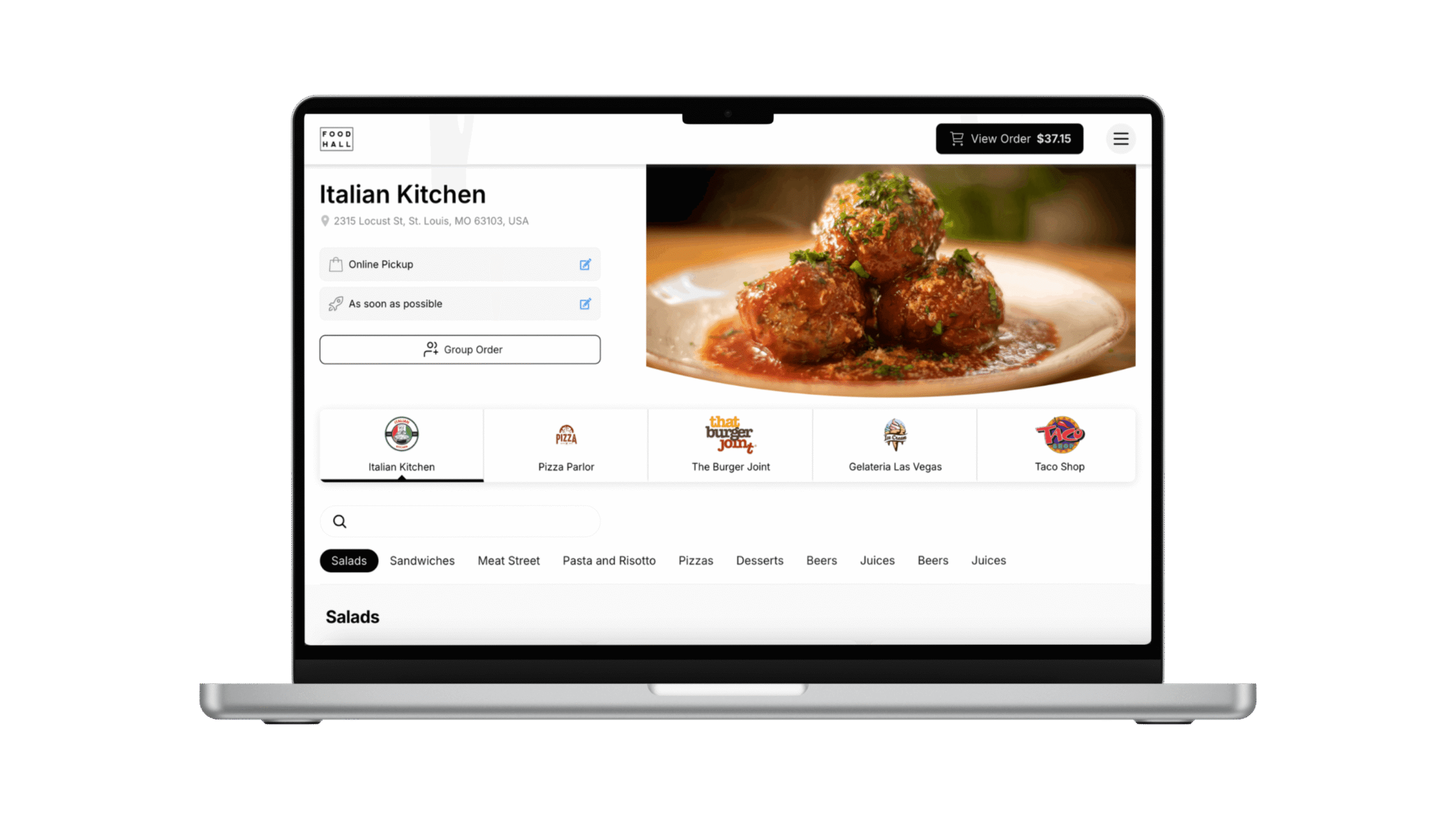
One cart. Multiple stalls. A single checkout. Tabski handles the complexity of shared-space food courts — vendor payouts, automated fees, DoorDash & Uber Eats integrations, and kitchen routing — right out of the box.

Food Courts That Run on Tabski
Traditional POS Systems Weren't Built for Food Courts
A food court is fundamentally different from a single restaurant. You have multiple independent vendors sharing one roof, one guest experience, and often one payment infrastructure. Legacy POS systems like Square, Toast, and Clover were designed for a single merchant — so operators are forced into clunky workarounds: separate transactions per stall, manual rent invoicing, and fragmented reporting.
Tabski was architected specifically for this model. Every stall gets its own merchant account, menu controls, and reporting — while guests see one unified cart, one checkout, and one receipt. The operator gets consolidated dashboards, automated rent deductions, and real-time visibility across every stall.

Everything a Food Court Needs, Nothing It Doesn't
Multi-Vendor Ordering
Guests browse all stalls and check out once. Orders route automatically to each vendor's kitchen display with separate settlement per merchant account.
QR Code Ordering
Scan a table QR, browse every stall, and pay — no app download required. Reduces lines and boosts throughput during peak hours.
Kitchen Display System (KDS)
Real-time order routing to each stall's KDS with SMS alerts for dine-in, pickup, and delivery. Reduces errors and keeps kitchens coordinated.
DoorDash & Uber Eats Built In
Accept orders directly from DoorDash and Uber Eats with zero commission fees on your end. Orders flow straight into the POS and KDS — no tablet juggling.
Automated Vendor Payouts
Rent, platform fees, and percentage-based charges are deducted automatically at batch. No manual invoicing, no chasing payments, no spreadsheets.
Unified Reporting
Hall-wide dashboards with vendor-level drill-down. See gross sales, net, tips, taxes, and labor across every stall in one place — exportable to CSV.
Open Tab Syncing
Guests open a tab at the bar; staff can add to it from the POS in real time. Both stay in sync so service is fast and seamless.
Offline Mode
Keep selling, taking payments, and printing receipts even when internet goes down. Everything syncs automatically when you reconnect.
Order Throttling
Automatically limit incoming orders during rush periods so kitchens never get slammed. Set per-vendor or hall-wide thresholds.
DoorDash & Uber Eats — Without the Commission Headache
Tabski's native delivery integrations pull orders directly from DoorDash and Uber Eats into your POS and KDS. Menus stay in sync, inventory updates automatically, and you avoid the manual re-entry that leads to errors and missed orders.
You can also offer your own branded online ordering page — guests order for pickup or delivery with zero platform commission. More control, better margins, same guest experience.
 Direct order ingest, zero extra tablets
 Pickup & delivery, live item availability

Every Stall Knows Exactly What to Make and When
Tabski's KDS routes orders to the right vendor the moment they're placed — whether from QR, POS counter, online, or delivery. Each stall's screen shows only their items, with real-time ticket times and SMS alerts for dine-in, pickup, and delivery completions.
An expo view gives you a cross-vendor completion status so runners know exactly when all items in a multi-stall order are ready — eliminating cold food and confused guests.
Guests Order from Every Stall Without Leaving Their Seat
Scan a QR code at any table or common area seating and you get a full menu across all food court vendors. Add from multiple stalls, check out once, and get an SMS when the order is ready. No app download, no separate lines, no confusion.
For venues with a central bar, open-tab syncing means a guest's phone tab and the bartender's POS tab stay in perfect sync — add items from either side, pay from either side.

Tabski vs Generic POS Systems for Food Courts
Most POS platforms were designed for single-operator restaurants. Here's how they compare for the actual challenges of a food court.
| Feature | Tabski | Square | Toast | Clover |
|---|---|---|---|---|
| Built for food courts / multi-vendor | ✓ Native | ✗ Workaround | ✗ Workaround | ✗ Workaround |
| Single cart, multiple stalls | ✓ | ✗ | ✗ | ✗ |
| Automated vendor rent & payout | ✓ Built-in | ✗ Manual | ✗ Manual | ✗ Manual |
| DoorDash & Uber Eats integration | ✓ Native | Limited | ✓ | Limited |
| QR ordering across all vendors | ✓ | Per-vendor only | Per-brand only | Per-merchant |
| Cross-vendor KDS expo view | ✓ | ✗ | ✗ | ✗ |
| Hall-wide reporting dashboard | ✓ | Manual consolidation | Single-brand only | Per-merchant only |
| Offline mode | ✓ | ✓ | ✓ | ✓ |
Food Court POS — FAQ
What is a food court POS system?
A food court POS system is point-of-sale software designed specifically for venues with multiple independent food vendors operating under one roof. Unlike a standard restaurant POS, a food court POS lets guests order from multiple stalls in a single transaction, routes each item to the correct vendor's kitchen, and handles split payments and vendor settlement automatically.
How is a food court POS different from a regular restaurant POS?
A standard restaurant POS assumes one merchant, one kitchen, and one set of books. A food court involves multiple independent merchants sharing one guest experience. That means you need multi-vendor cart logic, separate merchant accounts per stall, cross-vendor KDS routing, and automated payout infrastructure — none of which are native to Square, Toast, or Clover.
Does Tabski support DoorDash and Uber Eats for food courts?
Yes. Tabski integrates directly with DoorDash and Uber Eats, pulling delivery orders into your POS and routing them to the correct stall's kitchen display. Menus stay in sync across all channels and you avoid the manual tablet-switching that causes errors during busy periods.
How does automated rent collection work for food court operators?
Tabski deducts rent, percentage-based fees, and platform charges automatically during daily batch processing. Each vendor sees a clear settlement statement showing their gross sales, fees withheld, and net payout. Operators no longer need to invoice vendors or manually reconcile payments — it's all handled within the platform.
Can guests order from multiple food court stalls at once?
Yes — that's Tabski's core differentiator. Guests browse all vendors in a single interface (QR, kiosk, or online), add items from as many stalls as they want, and complete one checkout. Behind the scenes, payments are split to each vendor's merchant account automatically.
What happens if the internet goes down in a food court?
Tabski includes offline mode. Your staff can continue taking orders and processing payments even without internet connectivity. All data syncs automatically once the connection is restored — no manual re-entry required.
How much does a food court POS system cost?
Tabski's pricing is based on the size of your venue and number of vendors. See the full pricing page or schedule a demo to get a quote tailored to your food court.
See Tabski in Action
Join food court operators who've eliminated manual rent collection, unified their ordering experience, and increased revenue per guest.


